Five Ways To Stay Productive In Your Mobile Office
November 10th, 2008
As an independent wordsmith, I’m well acquainted with working in non-traditional work places; for instance, my main office (home) and the other locale’s I frequent (coffee houses).
Notice the title of this entry. It’s not about how to be productive. Anyone can be productive, if they so desire, every now and again, sometimes on purpose, sometimes not. My objective is to show you how to stay productive once you get there.
In Rise of the Creative Class (a personal favorite), author and sociologist Richard Florida wrote, “We are becoming a society in which Creative Class people literally live in a different kind of time from the rest of the nation.”
Who is this “Creative Class”?
If you can identify with the following quote – from later in Florida’s book – you’re part of it: “While Creative Class people do tend to work long hours, many other factors contribute to the feeling of being crunched for time…The big news about time [is that it] goes deeper than simply working more…We now try to pack every moment full of activities and experiences—at work, at home and at leisure.”
From where I sit, (Lux Coffeebar, if you must know), these are the things that cause me to be most productive in my mobile office:

(1) Account for my surroundings
- The local coffee joint has distinct advantages and disadvantages to working out of the home. Think of the cell phone commercial with the little time clocks in the trash. Pretend those little clocks are spread out all around your home office or moving around you at the coffee house. When you talk to someone longer than you should, you’re wasting time.
(2) Anticipate Distractions
- Make decisions before you get to your home office (or wherever) about where you’re going to sit. And yes, even if you’re in the bedroom, that’s still before you get to your desk.
- If it’s at home, think about the kinds of things that are likely to beg for your time: the laundry, that new album you wanted to check out on iTunes, updating umpteen social media outlets (Twitter, Facebook, LinkedIn, etc.) and any number of other noisy distractions. For me, even too much silence can be a distraction.
- If you’re at a coffee house, think about all the options you’ll be presented with about where to sit. It doesn’t matter if you’ve never been to this particular place before. Sit by the door (or facing it) and you’ll want to look up every time someone comes in; sit near the counter and you’ll be well-placed for shouts of , “Americano for Chris!”
- You know where the productive spots are, just like you know the best place to sit in a movie theater.
(3) Be Proactive
- The average time tracker says, “I have an hour to fill. I’ll work on project X and see how much I can get done.”
- A better time tracker says, “In one hour, I want to have completed this, this, and that, and this. And I’m going to spend this much time on each part. And I’ll check it off as I go and adjust the schedule in the moment. But I’m going to do it all in one hour.”
- The difference is subtle, but significant.
- It’s all about your motivation for tracking time at all. One person figures, “I have an hour right now. I’ll have another hour later.” The other person thinks, “I have an hour right now. I might have an hour later. I might not. I better use my time wisely while I have it on me.”

(4) Know when to say ‘No’
- To people around you.
- Say you have a significant other and he/she likes to chitchat throughout the day, but you’ve got a project that needs 100% of our concentration. Let him/her know you’re going into hyper-focus mode – or opt for a nonverbal method like putting on your headphones. (When I’m working in a public place, about a third of the time I’m wearing headphones, I’m not actually listening to anything. Ha!)
- To Yourself.
- There’s a difference between changing my mind about how long it will take me to do something and changing my time range because I’m tired of making decisions.
- Don’t confuse “self-employed” with “freedom from commitments”.
(5) Track The Time
- It’s called ‘tracking’ because you’re actively looking for clues about where The Time, somewhere out there in front of you, is headed.
- It’s not called ‘following’ because that’s passive and lets time make decisions for you.
- Time Trackers discover lost time.
- They literally “find time” to do more work, because the act of tracking time helps them right then; in the very moment they need it most. Ever hand write a note and then — because of the very act of doing so — you realize you could probably just throw the note away?
The first four steps have one thing in common: They’re all decided and acted on before hand. Only the last one takes place in the moment.
I’d elaborate on that, but right now, my time’s up.
Next time: Why Time Tracking Is Important For Freelancers.
(Phoenix wordsmith Joey Robert Parks is primarily a non-fiction ghostwriter. In the last six years, he’s written five books for successful, entrepreneurial types; including: a fashion designer and stylist who got his start working for JFK and Oprah; and a book on creative innovation for a high profile, multimillionaire philanthropist. To see how productive Joey is this very moment, follow him on Twitter or visit www.joeyrobertparks.com)
Productivity Ideas
September 3rd, 2008
Productivity Ideas:
- Having trouble keeping focused at work? Keep getting distracted by sites like Digg, Slashdot, and your RSS reader? A suggestion that we heard recently was to try this trick: Schedule time for reading blogs. Set a time and make it a high priority. You’ll realize how much time you spend reading sites, and become aware of it.
- Track your time in 15 minute increments. By tracking all of your working time, you’ll find yourself more focused and learn where you are wasting time.
- Create a set working-hours-schedule. An easy way to begin is to limit your working hours to a certain number per day. Or, a certain workday ending time.
- Move your desk, or get a second desk just for your computer. Sometimes having a workspace that is large enough to accomodate both your computer and your paperwork is where it is at. The extra space affords more creativity, inspires you to sketch ideas, and not use your computer as much. In the past, I have also physically picked up everything on my desk and moved it to another part of the office. New scenery and a change in pace was all I needed to get motivated.
Time Tracking Software for Mac
August 6th, 2008
A reader asks about tracking time on OS X:
Chris,
So here’s the deal: I now find myself with clients — people who are paying me money to do stuff for them. How cool is that? For some, I’ve set up a monthly set fee, others I’m charging by the hour. But for both, I’d like to track time on a slice-by-slice basis and give them a nice and fancy set of reports on how much time I spent doing what.
For the majority of what I do, I’m doing it right here on the MacBook Pro. So a nice little tool bar or icon on the task bar would be handy. What do you recommend?
Signed,
A Reader
Chris responds with a few time tracking suggestions:
Hello Reader,
Thank you for asking, we’ve researched a number of time-tracking apps and made a handy list of time tracking software at www.timetrackingresources.com — check it out!
A popular time tracking application that works across Windows and Mac is Harvest (but get the widget so you can track time from the desktop).
And there is a Mac Desktop widget called TimePost2 you can purchase that works with a lot of different time tracking web apps.
One more recommendation: Billings. We’ve heard from many satisfied customers of Billings that it is a useful tool.
Use one of those programs until Minuteglass, our own software application, is released. Minuteglass is going to be released by Tornado later this year. It’s a time tracking application (for Web, OS X, and Windows).
I hope that helps!
Regards,
Chris
Tools We Use: Now Do This
July 28th, 2008
I recently ran across a new web app called Now Do This. I’ve enclosed a screenshot to show what it looks like. It basically remembers your to-do items and only shows you what you should do next.
Tools We Use: TinyAlarm
July 26th, 2008
The other night I had dinner with a friend and he showed me a neat application he uses called TinyAlarm.
TinyAlarm is a Mac only tool which is free and installs easily on your taskbar. You can quickly set a timer and your computer will notify you at that time. It’s super simple, and is perfect for simple stuff like remembering to pick up pizza.
Scoble Interviews Tony Wright of RescueTime
July 20th, 2008
I just watched an interesting interview by Robert Scoble with the founder of RescueTime. In the interview they talk about their product which sits on the desktop and silently tracks which applications you use. Then it helps you see your actual productivity.
Tony Wright, the founder, reveals that by using their own product they realized an efficiency increase when a specific team member took a day off (after long periods of working on their product). Very interesting.
I have to give props to the quality of the video. Scoble really has an excellent setup with multiple cameras rolling at once to provide excellent video.
Lately I have been thinking about goals for this blog. Its ultimate purpose is to promote our own time tracking tool called Minuteglass (sign up for beta and we’ll email you when we’re launching). We’ve decided that sharing interesting tips and tools to help you track your productivity are an essential way to bring value to this blog. So expect more posts like this one in the future.
Two Years of Tracking Time: It’s worth it!
May 5th, 2008
Just about two years ago I began tracking my time every day while working. In fact, all of us at Tornado started tracking our time. During this two year period I’ve noticed a few key trends and wanted to share my findings.
I’m more motivated and work harder.
Having a timer running all day long that tracks both my billable and non-billable time has forced me to constantly evaluate my productivity. In a strange way it acts as a constant reminder to be productive at work. The key is to have the timer running all the time. That way you always have to change the timer from one task to another.
At the end of every day, I know exactly how much I’ve earned for our company.
Believe me, there is nothing more inspiring than to look at the time log for the day and see that I earned $700 (or whatever the amount is).
It’s a lot easier to bill customers.
Prior to tracking my time with software, I would jot down notes about what I was working on. Little did I know I was actually forgetting about half of what I had worked on. Plus, it was difficult to remember the exact day I had worked on a project.
We’ve developed some internal tools for helping us sort through all of our time entries and place them on invoices.
We also switched so that most of our projects are billed hourly.
The biggest difference we immediately noticed was a lack of stress surrounding client change requests. Suddenly, customers requesting changes became an opportunity to earn more money rather than give free time to a client (if it was within scope).
Two years ago 95% of our projects were on a fixed-bid cost basis. We would estimate a specific dollar amount for each project, and then work hard to try to keep the gig within that estimate.
What we’ve noticed now is that we write half as many proposals, and instead our customers (new and old) work with us on an hourly basis. If you’re in the design business and are looking for a change I can’t recommend it enough.
Speed!
The biggest change though has been in our momentum. We literally accomplish twice as much as we used to get done. In the past, we would get bogged down with writing customer proposals, spending hours spec’ing out projects, and dealing with customer change requests. Change requests are now an opportunity rather than a cost.
If you’re not sure where to begin, I recommend giving time tracking a try. Make a goal to track all of your time for one week and at the end of the week evaluate your results.
By the way, as a result of tracking my time, I know that 47% of my time in 2007 was billable. Our goal with our upcoming product is to make it easy for everyone to track all of their time.
Measure everything important and track everything worth tracking
April 18th, 2008
I’ve been thinking about the next generation web design studio quite a bit lately. What makes a team efficient? How can small teams maximize efficiency?
Bob Parsons who runs Go Daddy has written about tracking and measuring important business numbers. I read this and said “yeah, I need to do that.”
One thing I learned early in my business career is that anything of significance that is measured and watched, improves.
Back before I started Parsons Technology I became impressed with something I read about John D. Rockefeller. In fact, I still think about it and use it to this very day. I learned that Mr. Rockefeller was one of the few people in his industry (perhaps the only one) who knew exactly how much it cost to extract, refine and deliver a barrel of oil. In fact, he was entirely aware of all his costs. Knowing this information (and acting on it) gave him a huge competitive advantage. He knew how much he could price a barrel of oil for and still turn a profit. He was always keenly aware of each area of revenue, cost and market share, and he worked on improving in every area. As a result, he did cost saving things like manufacture his own oil barrels, have his own cartage company, and on and on.
The first sentence is the most important. Read it if you skipped over it.
This all brings me to my point. I think it’s very important to track the numbers that make your business a success. I’ve tried to do this over the years and have tracked a large number but never to the extent I want (for numerous reasons, not that I didn’t try).
As I said, I’ve been thinking about the next generation web firm and wondered what numbers you track in your business or where you work? The obvious things like revenue and billable hours are obvious, the less obvious are things like average employee utilization across a period of time, or average timespan to develop a site… How does this affect the bottom line? Does it give you a competitive advantage? I’ve got loads of ideas about things that can be tracked. Putting systems in place to actually track them (consistently) is the next step.
Safe Jobs
April 17th, 2008
On Saturday morning I packed up my camera and went to a little open house a friend of mine was throwing. It was a great time and of course I got to take pictures with my flash. There were a bunch of new people there that I had never met, and one guy in particular caught my attention.
After asking the two key questions people ask (where do you live and how do you know so and so) someone asked what he did for a living. He said he worked for the city. Then he commented that it was the safest job in the world and said that he would probably have to murder someone in order to get fired.
Maybe it’s time that our cities adopt the GE management idea and regularily trim the bottom 10% from their workforce.
One of the first things I thought about was the idea that “safe” means different things to different people. To this guy, safe means a steady paycheck and benefits. And I suppose he won’t have to dust off his resume too often.
To me, a safe job means that I’m in control of how much money I can make. That doesn’t always mean I get to pick when I work, but ultimately I am in charge.
So this got me thinking. Is there a way to combine both of these worlds. I think that profit sharing plans are a start, however I like some of the things that Semco does in Brasil. They basically put people in charge of their salary along with the ability to hire and fire their managers. Since their co workers can also vote to remove someone, there’s a lot of incentive to be fair.
I know that not everybody is in a position to introduce plans and systems like this, but I think it’s wise to consider and aim towards that goal. The trick always comes down to whether the people on your team have an owners mentality.
What’s the point of this post? Well, I just read a fun article called 10 Reasons You Should Never Get a Job. I have been approaching my business with this model recently. Building up an all-service business is hard because you have to spend time in order to earn money. That’s why I’m slowly moving into ideas that earn residual income. It’s not easy but everything has much greater potential.
And that’s really what it’s all about.
Time Tracking Software
March 24th, 2008
We just launched a site called TimeTrackingResources.com which is a list of great time tracking software and web services. We’ve researched our future competition and studied the features people want the most.
We realize that not everyone will find our software to be perfect for their uses. So check out this new web site and we hope you find something that works for you!
Time Saver: Launchy for Windows and Quicksilver for OS X
December 26th, 2007
Launchy for Windows is the program that helps me save 10 minutes every single day. I use it to launch programs and to pull up folders on our network. The best part: it’s free (and open source!). Now is a great time to try this program as they just released version 2.0 with tons of improvements.

Quicksilver for OS X is the Mac equivalent and is just as good and available for free.
How I stay organized
December 6th, 2007
I’m not perfectly organized. I’m probably a bad example of organization. But at work, I like to think I am organized.
1. Time Tracking: I track all of my time at work religiously. I know exactly what I was doing and when on any day this year (billable and non billable work).

2. Calendar: I organize my days with Google Calendar. In our office, we have a “Tornado Deadlines” calendar so any time we promise a client something it’s added.

3. To-Do-Lists: We use Todoist for tracking our to do list. We have a separate category for every one of our customers and share it in our office. Everyone knows what items are due today and in the next two weeks.

4. Email: In Outlook, I flag emails that need to be responded to. Only after that is completed, added to our Todoist task list do I unflag it. Or when the email is responded to.

What other tools do you use for tracking your life? There are so many ways to track projects and time and money. We’re working on a few that we will be releasing as well.
The good news is that everyone in our office uses these same tools (team of 3 people). This makes collaborating that much easier!
Don’t Break The Chain!
September 21st, 2007
With mild success I have been using Jerry Seinfeld’s productivity tip to track my workout routine.
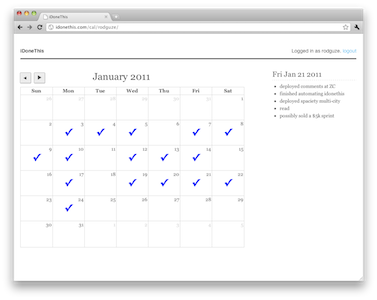
The idea is that you put a big red X on your wall calendar for every day that you do your work (in Jerry’s case, it was every day he wrote comedy). The idea then is to not beak the chain.
Here’s how it worked.
He told me to get a big wall calendar that has a whole year on one page and hang it on a prominent wall. The next step was to get a big red magic marker.
He said for each day that I do my task of writing, I get to put a big red X over that day. “After a few days you’ll have a chain. Just keep at it and the chain will grow longer every day. You’ll like seeing that chain, especially when you get a few weeks under your belt. Your only job next is to not break the chain.”
“Don’t break the chain.” He said again for emphasis.
Several sites have popped up since this tip emerged that help you track your chain of productivity. My favorite so far is www.dontbreakthechain.com (very aptly named). Anyways, it’s a great tip, and it definitely keeps you motivated.
My Thoughts on Deadlines
July 5th, 2007
For years I struggled over the concept of deadlines and wondered why it was so very difficult to meet them. And then I realized that in order to meet deadlines for software / web development projects, you really need the commitment of both the developer and the customer. You can always move the deadline, but if that’s what you want to do, at least call them milestones.
Most people suck at managing projects
Most people have more than one project going at a time, and when one deadline is moved it moves the other ones (whether you want to admit this or not).
The odds of a large project finishing on time are close to zero. — From Rapid Development (Amazon)
Today I learned that close to 25% of all airline trips are late
Wow, that’s stunning. It just goes to show that most people are optimistic and can’t even predict when a project will be done. There are countless tools that exist today to try to facilitate creating accurate estimates, but most of them are useless because we are all so busy, and a million things impact our days, thus impacting our schedules.
If missing deadlines wasn’t enough, there is a horrible failure rate in software development projects. Some people say 5 – 15% of all projects fail.
Say no, do less
Tips on the gentle art of saying no. I’m not going to comment further since I’m really bad at this.
Throw deadlines out
Stop thinking you can accurately predict the future. Give your customers a realistic expectation that you can have their project done during a window of time. You’ll quickly find that most people don’t need an exact “delivery date” for their projects. Instead they just want to know progress is being made.
I’m not suggesting that it’s good to be late on your projects, just that you accept the fact that it’s nearly impossible to meet deadlines the way you’ve been going after them, and you should change your procedure.
The deadline dance is not always productive.
Ten High Value Uses of Your Time
May 29th, 2007
Richard Koch, author of The 80/20 Principle: The Secret to Success by Achieving More with Less wrote this list of the top ten highest-value uses of your time.
- Things that advance your overall purpose in life
- Things you have always wanted to do
- Things already in the 20/80 relationship of time to results
- Innovative ways of doing things that promise to slash the time required and/or multiply the quality of results
- Things other people tell you can’t be done
- Things other people have done successfully in a different arena
- Things that use your own creativity
- Things that you can get other people to do for you with relatively little effort on your part
- Anything with high-quality collaborators who have already transcended the 80/20 rule of time, who use time eccentrically and effectively
- Things for which it is now or never
How to make an extra $4,687.50 this year
March 1st, 2007
That’s enough to take the family on a nice vacation. Once our company switched to billing per-hour for (almost) all of our projects, our profits soared. We’re delighted because we’re now doing an amazing job tracking our time. Both billable and non billable.
The figure that I mentioned above — $4,687.50 — represents the accumulation of only an hour and fifteen minutes a week in billable hours. A paltry fifteen minutes a day, at $75 an hour, adds up to a nice vacation at the end of the year. Counting only 5 day weeks for 50 weeks a year.
Amazing, huh? Imagine what you could do if you tracked an extra hour a day.
Most companies just give away time like this. It’s too-small to track, they say. But the reality is that if you use an efficient tool for tracking time, it’s easy! And it pays off, as you can see.
Minuteglass is that tool (just wait until we launch!)
I hope that this demonstration helps you appreciate the value of tracking your time. It’s stunning, really, how most people don’t track time. If you charge your customers an hourly rate, it pays to track your time with a solid time tracking tool. It’s important to “independent agents” and also large companies of any size.
Benefits of tracking time:
- Earn more money by tracking your time better.
- Keeps you focused on your task at hand. When the clock is running, you know you need to be productive.
- Motivation: At the end of the day, if you can look at your time log and see how much you accomplished, and how much money you earned, it boosts your enthusiasm for what you do.
- It helps you estimate future projects (you can see how long a similar project took).
- Even if you don’t bill your customers an hourly rate, it’s great to know how much you work, and really know.
Tips for Staying Organized: On Paper
February 1st, 2007
Paper is great. You can easily use it to stay organized. In many ways, paper is better than any software tool for keeping up to date on your tasks. You can take it anywhere!
I present you with four links that will help you organize your projects and your life on paper.
- Moleskine PDA — Using your Moleskine notebook as a project and task organizer. Simple but clever.
- The Emergent Task Planner — An amazing paper based tool for staying on track in your day.
- Paper Prototyping — Paper prototypes invite people with little-to-no technical background into the design process.
- Remember names at meetings by making a map — Sometimes the obvious ones are the best.
My favorite tip of all time is this: Grab a sheet of paper and write down what you are going to accomplish today. Then make a new sheet every single day (or every night, before you head home).
How To Figure Out Your Hourly Rate
January 27th, 2007
Freelancers and people new to the service industry ask this often enough: Should I charge an hourly rate or should I give people specific quotes?
Going hourly is often the best, and the easiest since you can avoid the headache of trying to charge more when a client changes the scope of a project (that happens more often than not, in my experience).
Neil Tortorella from Creative Latitude has written an excellent guide for those thinking about billing your projects hourly. He answers the important question of how much to charge per hour to meet your profit goals.
The process to figure out your hourly rate:
- What’s your target salary? How much do you want to make in a year?
- On top of that, you’ll need to figure in other associated costs like taxes, FICA, insurance, etc.
- Total up the number of working hours available to you, subtracting vacation, sick days, and holidays
- Figure out what percentage of your day is non-billable and subtract that (typically 25% – 50% depending on a lot of factors)
- Divide your target salary by the number of working days you have
- Figure out what your overhead is, and calculate the total cost of overhead for each working hour
- The final rate is the number you’ll use to do your estimating, whether you charge by the hour or by the job. It’s the number you can’t afford to go below.
Does that make sense? Read Neil’s article for the full details.
I’ll spend some more time in the future talking about providing clients with fixed-bids, and how to avoid problems with scope creep and avoiding endless projects.
Smashing The Clock, Best Buy Imagines a Better Workplace
December 12th, 2006

Imagine a workplace where you were rated based on your productivity.
Imagine a workplace where a results were rewarded, and not just sheer working hours.
Imagine what would happen if you could work less, even 4 days a week.
Did America go down the right path when we began the 40 hour work week?
Smashing The Clock is an interesting article about an experiment at Best Buy called ROWE, for “results-only work environment.”
At most companies, going AWOL during daylight hours would be grounds for a pink slip. Not at Best Buy. The nation’s leading electronics retailer has embarked on a radical–if risky–experiment to transform a culture once known for killer hours and herd-riding bosses. The endeavor, called ROWE, for “results-only work environment,” seeks to demolish decades-old business dogma that equates physical presence with productivity. The goal at Best Buy is to judge performance on output instead of hours.
BusinessWeek Online: Smashing The Clock
Twenty Time Savers
November 30th, 2006
Among the twenty time saving tips listed on this page, the one that hits home the most is this one: Do difficult things quickly; waiting doesn’t make them easier. It’s a fact of life that sometimes difficult tasks present themselves. Getting those ones out of the way first can free your mind and allow you to concentrate better.
Here are the rest of the tips:
- Learn to set priorities on things like goals, tasks, meeting agenda items, interruptions.
- Start with “A-priority” tasks; is it the best use of your time?
- Fight procrastination; do it now if it’s important.
- Subdivide large, tough tasks into smaller, easily accomplished parts.
- Establish a quiet hour, even though it requires will power and may not always work.
- Find a hideaway. The library or office of a co-worker who’s traveling.
- Learn to say “no” when you’ve got something important to do.
- Learn to delegate.
- Accumulate similar tasks and do them all at one time.
- Minimize routine tasks; spend only the time they deserve. Shorten low-value interruptions. Throw away junk mail and other low-value paperwork. Delegate, shorten or defer indefinitely the C-priority tasks.
- AVOID PERFECTIONISM. Remember the 80/20 maldistribution rule.
- Avoid over-commitment. Be realistic about what you can do in the time you have.
- Don’t over-schedule. Allow some flexible time for crises and interruptions.
- Set time limits. For example, some decisions shouldn’t take more than three minutes to make. Know how to recognize these.
- Concentrate on what you are doing.
- Use big blocks of time for big jobs.
- Do difficult things quickly; waiting doesn’t make them easier.
- Try to handle paper only once.
- Think the job through before acting.
- Finish as you go; get it right the first time.
It’s a great list, isn’t it?
Now let’s talk a bit about the 80/20 rule
If you got through that list and wondered what the maldistribution rule is, here’s a quick explanation: Twenty percent of the things you have on your “to do” list will provide you with eighty percent of the payoff.
It is also referred to as the Pareto principle, or the 80-20 rule.
I found a site that goes in depth on the 80/20 Rule of Time Management:
Vilfredo Pareto, an Italian economist, “discovered” this principle in 1897 when he observed that 80 percent of the land in England (and every country he subsequently studied) was owned by 20 percent of the population. Pareto’s theory of predictable imbalance has since been applied to almost every aspect of modern life. Given a chance, it can make a difference in yours.
And lastly, a tip that wasn’t included on the list
The last tip I want to provide is this: If you stop and actually track your time, both billable and non billable, and actually make an effort to do so, you’ll find that as you become more aware of how you use time, you waste less of it.
Google 20% Time
I’m sure you are all familiar with how Google let’s it’s engineers and other employees spend 20% of their time on side projects. According to Google’s Vice President of Search Products and User Experience, half of new product launches originated from 20% time. (source). That’s a great return on investment, and I suspect it originates from the fact that employees have something to look forward to, and their job doesn’t become mundane.